Lesson 07: What Happens When You Type a URL
Roadmap
You are in System Design Interview Prep, Track 02, Networking from Zero: lesson 7 of 30. It builds on lesson 5, where the internet's work was split into four layers, and lesson 6, the OSI numbers. Here we watch all the layers work together, the TCP/IP model in action, from the moment you press Enter. The next lesson is TCP part 1: sequence numbers and ACKs. See the track overview for the whole plan.
These are the written notes for the lesson's video. Prefer paper? The same notes are a free, printable PDF: download SD-N-007.pdf.
Concept
Pressing Enter starts four conversations, in order: DNS, the TCP handshake, the TLS handshake and HTTP. Each costs about one round trip, so a cold page load waits about four round trips before the first byte. The error you see tells you which step failed.
Words you'll meet today
| Word | In plain words |
|---|---|
| URL | a web address: protocol, server name and path |
| DNS | the internet's phone book: a name to an IP address |
| DNS resolver | the server that looks names up for you, usually your provider's |
| Handshake | the opening exchange before any data |
| TLS | the encryption behind the S in HTTPS |
| Certificate | the server's proof of who it is |
| Round trip (RTT) | a message there and the reply back |
| Cold start | a first visit, with nothing cached and no connection open |
The question: what happens in a quarter of a second?
You type backendroadmap.com and press Enter. A quarter of a second later, the page is on your screen.
In that blink, your browser held at least four separate conversations, using every layer from lesson 5. Today we follow them in order, one step at a time. It's also one of the most famous interview questions.
An everyday picture first: calling a new restaurant
You want to order food from a restaurant you've never called. You look up its number in a phone book. You dial, and you both check you can hear each other.
You agree on a private code, so nobody listening can understand. You place the order. The food arrives, and you set the table. Every step must finish before the next one starts.
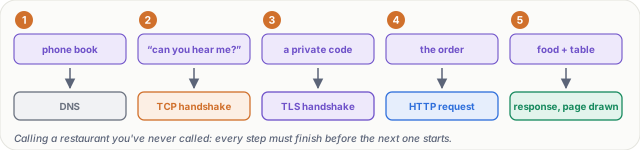
Figure 1. The analogy: looking up the number, checking you can hear each other, agreeing a private code, ordering and eating map onto DNS, the TCP handshake, the TLS handshake, the HTTP request and the response.
Step 0: read the URL
The browser reads the URL. https: means use HTTPS, so port 443. backendroadmap.com is the name of the server. And /system-design is the page you want on it.

Figure 2. Anatomy of a URL: the protocol (HTTPS, so port 443), the server's name, and the path of the page you want.
Step 1: DNS, the phone book
Computers don't send packets to names; they need an IP address. So step 1 is the phone book lookup.
Your laptop asks a DNS resolver, usually run by your internet provider: what's the address of backendroadmap.com? The resolver answers 198.51.100.10. The answer is stored for a while (cached), so next time it's instant.
Notice the layers. The question is a DNS message, at the application layer. It travels in UDP, to port 53, inside IP packets, over Wi-Fi. The same stack as every other message. DNS gets two full lessons of its own, 15 and 16.
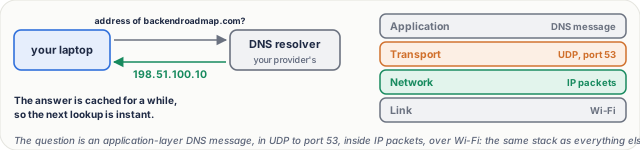
Figure 3. Step 1, DNS: the laptop asks a resolver for the server's IP address and caches the answer. The question travels through the same four layers as everything else.
Steps 2 and 3: the TCP and TLS handshakes
The TCP handshake. Your laptop sends a SYN: can we talk? The server replies SYN-ACK: yes, can you hear me? Your laptop answers ACK: yes. Now a connection exists. Lesson 9 shows each message in detail.
The TLS handshake. Browser and server agree on keys for encryption, and the server proves who it is with a certificate. From now on, nobody in between can read or change the data. Lessons 20 to 22 cover keys, the handshake and certificates.
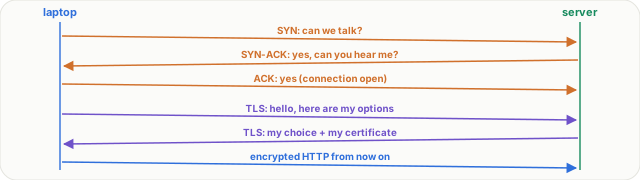
Figure 4. Steps 2 and 3: the TCP three-way handshake (SYN, SYN-ACK, ACK) opens a connection; the TLS 1.3 handshake agrees keys and proves the server's identity with a certificate.
Steps 4 to 6: HTTP, the server, the page
- The HTTP request.
GET /system-design, with a few headers, like which browser you use and which formats you accept. - The server does its work. Maybe it reads a database and builds the page, then replies:
200 OK, and the HTML. - The browser draws the page. The HTML says it needs more: a style sheet, some scripts and images. The browser asks for those too, usually over the same connection, and draws the page.
So the four conversations are DNS, the TCP handshake, the TLS handshake and HTTP. Each one needs the one before it.
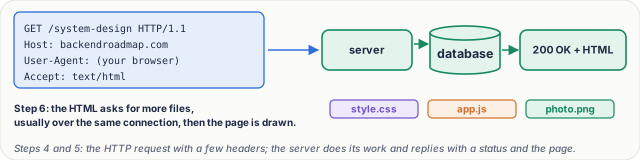
Figure 5. Steps 4 to 6: the HTTP request with its headers, the server's work and reply (200 OK and the HTML), then the extra files the page needs.
Real numbers: count the round trips
Say a round trip to the server takes 50 ms.
| Step | Round trips | Time |
|---|---|---|
| DNS (not cached) | 1, often more | 50 ms |
| TCP handshake | 1 | 50 ms |
| TLS 1.3 handshake | 1 | 50 ms |
| HTTP request and reply | 1 | 50 ms |
| Before the first byte | 4 | ≈ 200 ms |
| Server's own work | – | ≈ 50 ms |
| Total | ≈ 250 ms |
That's the quarter of a second from the start.
Notice: most of that time isn't data; it's waiting for replies. That's why the speed of light, and the distance to the server, matter so much, and why CDNs, servers close to you, exist (lesson 28).

Figure 6. Counting round trips on a cold start: DNS, TCP, TLS 1.3 and HTTP each cost about one, so 200 ms of waiting before the first byte, plus the server's own work.
What goes wrong: the error names the step
- DNS fails: the browser says the server's IP address could not be found. The name has no answer.
- The TCP handshake fails: connection refused, or connection timed out. The address was found, but nothing answered on that port.
- TLS fails: your connection is not private. The certificate is wrong or expired.
- HTTP fails: everything else worked, and you get a page with a status code: 404 not found, or 500, a server error.
So reading the error tells you which step, and which layer, to fix.
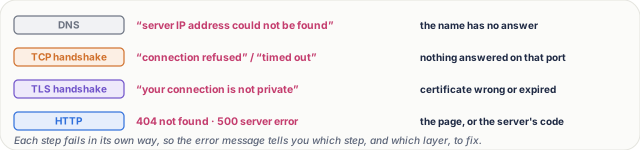
Figure 7. What goes wrong: each of the four conversations has its own error, so the message tells you which step failed.
Pause and think
One minute later, you open another page on the same site. It loads much faster. Which steps did the browser skip? Decide before you open the answer.
Answer
Usually three of the four. DNS is cached, so no lookup. And the connection is kept open, so no TCP or TLS handshake. Only the HTTP request remains: one round trip instead of four. That's why keeping connections open matters so much (lesson 29).

Figure 8. The pause-and-think answer: on a second page a minute later, DNS is cached and the connection is still open, so only the HTTP request remains.
Common mistakes
- "The browser goes straight to the server." No. It first needs the address (DNS), then a connection (TCP), then encryption (TLS); only then can it ask for the page.
- "A faster server fixes a slow page." Often not. On a cold load most of the time is round trips; fewer and shorter round trips (caching, keep-alive, CDNs) usually help more.
Recap in three lines
- Typing a URL starts four conversations: DNS, the TCP handshake, the TLS handshake and HTTP.
- Each costs about one round trip, so distance and caching decide most of the wait.
- The error you see tells you which step failed.
Interview questions
What happens when you type a URL into a browser and press Enter? (Basic)
What to say in 30 seconds
The browser parses the URL, resolves the name to an IP address with DNS (usually from a cache), opens a TCP connection with the three-way handshake, and for HTTPS does a TLS handshake that agrees keys and checks the certificate. Then it sends the HTTP request, the server responds with the HTML, and the browser fetches the other files, CSS, scripts and images, usually over the same connection, and renders the page.
Which protocols, at which layers, are involved? (Basic)
What to say in 30 seconds
DNS (application layer, normally over UDP port 53) to find the address; TCP (transport) for the connection; TLS for encryption, which runs above TCP inside the application; HTTP (application) for the request and response; IP (network) carries every packet; and Ethernet or Wi-Fi (link) moves them hop by hop.
Why is the first visit to a site slower than the second? (Scenario)
What to say in 30 seconds
A cold start pays for DNS, the TCP handshake and the TLS handshake before the request, about four round trips in all. A minute later the DNS answer is cached and the connection is usually still open (keep-alive), so only the HTTP request and response remain, often one round trip. Browser caching of files saves even more.
A user sees “connection timed out”. Which step failed, and what would you check? (Scenario)
What to say in 30 seconds
DNS worked, because there is an address; the TCP handshake failed, because nothing answered on that port. Check that the server is up and listening on 443, firewall and security-group rules, and the load balancer's health. If it said the IP address could not be found, it would be DNS; “not private” would be TLS; a 500 would be the application.
How long does a cold page load take, at minimum, if the round-trip time is 50 ms? (Tricky)
What to say in 30 seconds
About four round trips before the first byte: DNS (one or more if not cached), the TCP handshake (one), TLS 1.3 (one) and the HTTP request (one): roughly 200 ms, plus the server's processing time. TLS 1.2 costs two round trips, and HTTP/3 over QUIC combines the transport and TLS handshakes into one.
Most of that time isn't data. What does that mean for design? (Tricky)
What to say in 30 seconds
Latency, not bandwidth, dominates small requests, and latency is mostly distance. So reduce round trips (keep connections open, cache DNS and files, use HTTP/2 or 3) and shorten them (put content close to users with a CDN). Making the server faster helps only the small part of the time it owns.
Free PDF notes
Download these notes as a printable PDF, with every picture, the round-trip count and the interview answers: SD-N-007.pdf.
Sources
- RFC 3986: Uniform Resource Identifier (URI): Generic Syntax, the parts of a URL.
- RFC 1034 and RFC 1035: Domain Names, DNS and its use of UDP port 53.
- RFC 9293: Transmission Control Protocol, the three-way handshake.
- RFC 8446: TLS 1.3, the one-round-trip handshake and certificates.
- RFC 9110: HTTP Semantics, requests, headers and status codes such as 200, 404 and 500.
- RFC 9000: QUIC, which joins the transport and TLS handshakes for HTTP/3.
- RFC 5737: IPv4 Address Blocks Reserved for Documentation, where the example address 198.51.100.10 comes from.
Next
Next comes lesson 8, TCP part 1: how sequence numbers and acknowledgements make sure no data is ever lost. The track overview lists the whole series.