Lesson 05: Protocols and Layers: Agreed Languages, and Why We Stack Them
Roadmap
You are in System Design Interview Prep, Track 02, Networking from Zero: lesson 5 of 30. It builds on lessons 2, 3 and 4, where a packet got a header, an IP address found the device and a port found the app. Here we see how all of those fit together as layers. The next lesson is the OSI model. See the track overview for the whole plan.
These are the written notes for the lesson's video. Prefer paper? The same notes are a free, printable PDF: download SD-N-005.pdf.
Concept
A protocol is a set of agreed rules, so two machines understand each other. The internet splits the work into four layers, application, transport, network and link, each with its own protocol (HTTP, TCP, IP, Wi-Fi or Ethernet). On the way down each layer adds its own header (encapsulation); on the way up each layer removes it. So one layer can change without touching the others.
Words you'll meet today
| Word | In plain words |
|---|---|
| Protocol | agreed rules for talking, so two sides understand each other |
| Layer | one job in a stack of jobs, with its own protocol |
| Header | a label a layer adds in front of the data |
| Encapsulation | wrapping data inside a header, layer by layer |
| Segment | data plus a TCP header (transport layer) |
| Packet | a segment plus an IP header (network layer) |
| Frame | the package for one link: a packet plus a link header and check value |
| MTU | the biggest packet one link carries: 1,500 bytes on Ethernet |
The question: how do strangers understand each other?
You open a shopping app and tap Buy. Your phone was made by one company. The shop's server, by another. And your order crosses Wi-Fi, a fibre cable and routers built by many others.
None of them ever met. Yet your order arrives, and it is understood perfectly. How? Two ideas: protocols, and layers.
A protocol is agreed rules
You already use one every day: a phone call. Someone picks up and says hello. You say who you are. You take turns to talk. Then you both say bye, and hang up.
Nobody wrote these rules down, but both sides follow them. If one side stayed silent, or spoke a language the other didn't know, the call would fail. That's a protocol: agreed rules, so two sides understand each other.
Computers need the same, but exact. In HTTP, the protocol of the web, the browser sends GET /shoes. The server must answer with a status, like 200 OK, and then the page. Both follow the same rulebook, so machines from different companies understand each other.
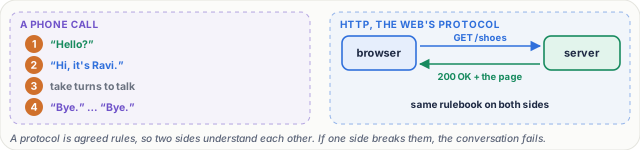
Figure 1. A protocol is a set of agreed rules. A phone call follows unwritten ones; HTTP writes them down exactly, so machines from different companies understand each other.
Why one protocol isn't enough
One protocol can't do everything. Someone must find the address. Someone must check that nothing was lost. Someone must move the bits over Wi-Fi. So we split the work into layers.
An everyday picture first: sending a gift
You send a gift to a friend in Pune. You write a card, in a language your friend can read. That's your only job.
The courier packs it in a box with a tracking number, so nothing gets lost, and it reaches the right person. The hub writes the city and the street address. Then a van, a truck, maybe a plane, each moves it one stretch of the way.
Notice two things. Each person reads only their own label: the van driver never opens your card. And you can swap one part: send it by train instead of truck, and your card doesn't change.
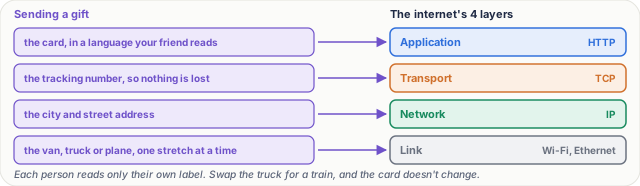
Figure 2. The gift, layer by layer: the card is the application layer, the tracking number is transport, the address is the network layer, and the van is the link layer.
Now the real thing: four layers
| Layer | Protocols | Its one job | In the gift picture | Unit |
|---|---|---|---|---|
| Application | HTTP, DNS, SMTP | what the app means | the card | data |
| Transport | TCP, UDP | the right app (ports); for TCP, nothing lost, in order | the tracking number | segment |
| Network | IP | from and to addresses: find the device anywhere | the city and street | packet |
| Link | Wi-Fi, Ethernet, mobile data | move the bits across one link, to the next device | the van | frame |
For the curious. This four-layer version is the TCP/IP (internet) model. Lesson 6 covers the seven-layer OSI model you'll hear in every interview, and lesson 7 follows a URL through the TCP/IP model.
Step by step: encapsulation
- Application. Your app writes the data:
GET /shoes. - Transport. TCP adds its header in front: from port 51,234, to port 443, plus a sequence number. The data plus this header is called a segment.
- Network. IP adds its own header in front of that: from your IP address, to the server's. Now it's a packet.
- Link. The link layer wraps the whole packet in a frame. It adds the hardware address of the next device, your Wi-Fi router, and a check value at the end to catch damage.
This wrapping, layer by layer, is called encapsulation.
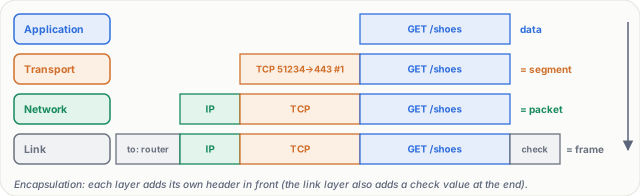
Figure 3. Encapsulation on the way down: the data gets a TCP header (a segment), then an IP header (a packet), then a link header and trailer (a frame).
At the other end, it runs in reverse. Each layer reads only its own header, removes it, and passes the rest up: link, then IP, then TCP. Finally, the web server reads GET /shoes. Like opening boxes inside boxes.
Real numbers
On Ethernet, one frame carries a packet of at most 1,500 bytes. The IP header usually takes 20 bytes, and the TCP header at least 20. So each packet carries up to 1,460 bytes of your data.
A 3 MB photo is 3,000,000 bytes. 3,000,000 ÷ 1,460 ≈ 2,055 packets: the photo in 2,000 pieces from lesson 2. And all those headers add 40 ÷ 1,460, under 3%.
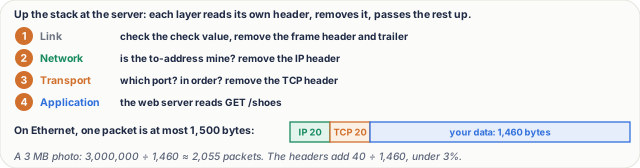
Figure 4. On the way up each layer removes only its own header. The sizes: 20 bytes of IP header and at least 20 of TCP leave up to 1,460 bytes of data in a 1,500-byte packet.
Why bother with layers?
- One job each. Each layer does one job, and does it well.
- Swap a layer. Replace Wi-Fi with a cable, and HTTP, TCP and IP don't change at all.
- Different builders. The app maker, the operating system and the chip maker build different layers, and they still fit together.
What goes wrong
- A damaged frame. Noise on the Wi-Fi damages a frame. The link layer checks the check value, sees it doesn't match, and drops the frame. The layer above notices: TCP sees a missing piece, and sends it again (lesson 8 shows exactly how). Your app never even knows. Each layer handles its own problems.
- The wrong protocol. Send plain HTTP to a port that expects HTTPS, and the server can't read it. You get an error, like
400 Bad Request. Both sides must speak the same protocol, at every layer.
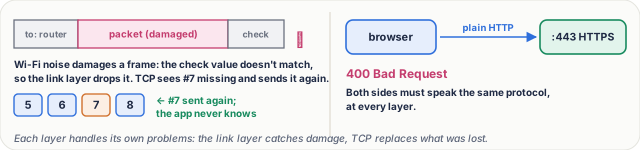
Figure 5. What goes wrong: a damaged frame is dropped by the link layer and resent by TCP, and a protocol mismatch (plain HTTP to an HTTPS port) gets an error.
Pause and think
Your home internet is upgraded, from an old copper line to fibre. Does your browser need an update? Decide before you open the answer.
Answer
No. Only the bottom layer changed, on that one link. The network, transport and application layers above it work exactly as before. That's the whole point of layers.
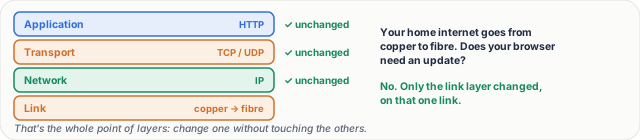
Figure 6. The pause-and-think answer: swapping copper for fibre changes only the link layer; the network, transport and application layers work exactly as before.
Common mistakes
- "TCP/IP is one protocol." No. It's a family named after its two main members: TCP at the transport layer and IP at the network layer, with HTTP above and Wi-Fi or Ethernet below.
- "Every device reads every header." No. A router in the middle looks at the link and IP headers to pass the packet on; only the two end devices read the TCP header and the data.
Recap in three lines
- A protocol is a set of agreed rules, so two machines understand each other.
- The internet stacks four layers: application, transport, network and link, each with one job.
- Going down, each layer adds its header, and going up, each one removes it.
Interview questions
What is a protocol? Give an example. (Basic)
What to say in 30 seconds
A protocol is a set of agreed rules for how two sides exchange messages: what to send, in what format, in what order, and what to do when something goes wrong. HTTP is one: the client sends a request such as GET /shoes, and the server must answer with a status line such as 200 OK, headers and a body.
What are the layers of the internet (TCP/IP) model, and what does each do? (Basic)
What to say in 30 seconds
Four layers. Application (HTTP, DNS): what the app means. Transport (TCP, UDP): which app, by port, and for TCP, reliable in-order delivery. Network (IP): addressing and routing to the right device anywhere. Link (Ethernet, Wi-Fi): moving frames across one physical link to the next device.
What is encapsulation? (Basic)
What to say in 30 seconds
On the way down, each layer wraps what it gets from the layer above with its own header: data plus a TCP header is a segment, plus an IP header is a packet, plus a link header and trailer is a frame. On the way up, each layer reads and removes only its own header and passes the rest up.
Why do we use layers at all, instead of one big protocol? (Scenario)
What to say in 30 seconds
Separation of concerns. Each layer does one job and only talks to the layers next to it, so you can change one without touching the others: replace Wi-Fi with fibre, or HTTP/1.1 with HTTP/2, and the rest keeps working. Different vendors can build different layers, and each layer handles its own errors.
How much of a 1,500-byte packet is your data? (Tricky)
What to say in 30 seconds
With a 20-byte IPv4 header and a 20-byte TCP header (no options), 1,460 bytes, which is the usual TCP maximum segment size on Ethernet. Options (timestamps are common) take 12 more, and IPv6 has a 40-byte header, so the real figure is often a bit less.
A frame is damaged on Wi-Fi. Which layer notices, and which layer fixes it? (Tricky)
What to say in 30 seconds
The link layer notices: the check value at the end of the frame doesn't match, so it drops the frame. It does not fix it; TCP, at the transport layer, sees the missing data and sends it again. The application never knows. Each layer handles the problems of its own job.
Free PDF notes
Download these notes as a printable PDF, with every picture, the layer table and the interview answers: SD-N-005.pdf.
Sources
- RFC 1122: Requirements for Internet Hosts, Communication Layers, the internet's layers (application, transport, internet, link).
- RFC 9110: HTTP Semantics, requests, methods and status codes such as 200 and 400.
- RFC 9293: Transmission Control Protocol (TCP), the TCP header, ports and sequence numbers.
- RFC 791: Internet Protocol, the IPv4 header (20 bytes without options).
- RFC 894: A Standard for the Transmission of IP Datagrams over Ethernet Networks, the 1,500-byte limit on Ethernet.
- RFC 879: The TCP Maximum Segment Size and Related Topics, why 1,500 bytes leaves 1,460 for data.
Next
Next comes lesson 6, the OSI model: the seven-layer version you'll hear in every interview. Until then, the track overview lists the whole series, and lesson 8 is already out.