Lesson 03: IP Addresses: The Street Address of Every Device
Roadmap
You are in System Design Interview Prep, Track 02, Networking from Zero: lesson 3 of 30. It builds on lesson 2, where every packet carries a header saying where it's from and where it's going. The next lesson is ports and sockets. See the track overview for the whole plan.
These are the written notes for the lesson's video. Prefer paper? The same notes are a free, printable PDF: download SD-N-003.pdf.
Concept
An IP address is a device's address on a network. It has a network part (which network, like the building) and a device part (which device, like the flat number). IPv4 addresses are four numbers from 0 to 255, 32 bits, about 4.3 billion in all, so homes use private addresses behind one public address, and DHCP keeps every address on a network unique.
Words you'll meet today
| Word | In plain words |
|---|---|
| IP address (internet protocol address) | a device's address on a network |
| IPv4 | the classic kind: four numbers from 0 to 255, 32 bits |
| IPv6 | the newer kind: 128 bits, far more addresses |
| Public / private address | reachable from the internet / only inside a network |
| Router | the box that joins networks and passes packets on |
| DHCP (dynamic host configuration protocol) | the service that lends each device a free address |
| Bit / byte | a bit is one 0 or 1; 8 bits make a byte |
| Localhost (127.0.0.1) | an address that always means this same device |
The question: how does a message find one phone?
You type a friend's name in WhatsApp and press send. Out there are about two billion other phones. Yet your message reaches exactly one: your friend's.
A courier does this every day. Out of a million flats, he finds the right door, because every flat has an address.
So what is a computer's address? What does it look like? And what happens when two devices share one?
An everyday picture first: the courier
A courier has a parcel for flat 5, MG Road, Bengaluru, India. He goes country, then city, then street. Only then does he look for the flat.
There are two parts. India, Bengaluru, MG Road gets him to the right building. Flat 5 finds one door inside it. And no two flats in a building share a number, or he wouldn't know where to knock.

Figure 1. The courier's address: country, city and street get him to the right building; the flat number finds one door inside it.
Now the real thing
| The courier | In a network |
|---|---|
| The parcel | your message, cut into packets (lesson 2) |
| The courier | the network and its routers |
| The address on the parcel | the IP address, written in each packet's header |
| Country, city, street (the building) | the network part of the address |
| The flat number | the device part (also called the host part) |
Exactly where the line between the two parts falls is lesson 13, subnets and CIDR.
What an IP address looks like
Here's a real one: 192.168.1.5. Four numbers, with dots between them. This kind is called IPv4, version four, and it's the one you'll see most.
Each number goes from 0 to 255. Why? Each one is stored in 8 bits, one byte. A bit is a single 0 or 1, and 8 bits can count 256 values: 0 (00000000) to 255 (11111111).
So the whole address is four bytes: 32 bits. Here, 192.168.1 is the network part, the building. And 5 is this phone's flat number.
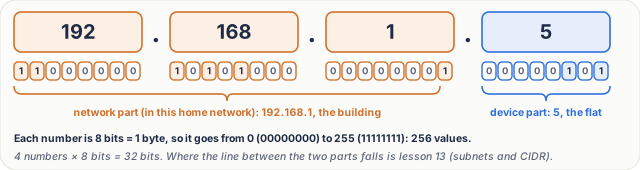
Figure 2. Anatomy of an IPv4 address: four numbers, each one byte (0 to 255), 32 bits in all; here 192.168.1 is the network part and 5 the device part.
Real numbers: why we ran short
| Question | Arithmetic | Answer |
|---|---|---|
| values in one number | 2⁸ | 256 (0 to 255) |
| bits in an IPv4 address | 4 × 8 | 32 bits |
| IPv4 addresses | 256 × 256 × 256 × 256 = 2³² | 4,294,967,296, about 4.3 billion |
| IPv6 addresses | 2¹²⁸ | ≈ 3.4 × 10³⁸ (a 39-digit number) |
4.3 billion sounds like a lot. But there are over 8 billion people, many with a phone, a laptop and a TV, plus every server. The last big free blocks of IPv4 addresses ran out in 2011.
There are two fixes:
- IPv6, with addresses 128 bits long, written in hexadecimal groups such as
2001:0db8:85a3:0000:0000:8a2e:0370:7334. That's a number of addresses with 39 digits: plenty for every grain of sand on Earth. - Private addresses, reused in every home. That's the next section.
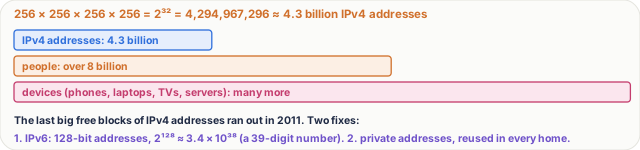
Figure 3. Real numbers: 32 bits give about 4.3 billion addresses, fewer than the people on Earth, let alone their devices.
At home: private addresses, one public address
Your Wi-Fi router gives each device a private address. Your phone gets 192.168.1.5, your laptop 192.168.1.6, and the TV 192.168.1.7.
Three ranges are kept for private use. Millions of homes reuse them, and that's fine, because they never leave the home.
| Private range | Written as (lesson 13) | Size |
|---|---|---|
| 10.0.0.0 to 10.255.255.255 | 10.0.0.0/8 | 16,777,216 addresses |
| 172.16.0.0 to 172.31.255.255 | 172.16.0.0/12 | 1,048,576 addresses |
| 192.168.0.0 to 192.168.255.255 | 192.168.0.0/16 | 65,536 addresses |
Your router also has one public address, on its outside, for example 203.0.113.7. The whole internet can reach it. To the internet, your whole family is that one address. How the router shares it (NAT, network address translation) is lesson 14.
And one special address: 127.0.0.1, called localhost. It always means this same device: a program that sends to it is talking to itself.
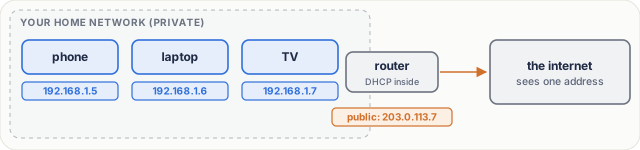
Figure 4. At home, the router gives each device a private address and shows the internet one public address.
See your own. On a phone, open Wi-Fi settings and tap your network. On Windows, type ipconfig. On a Mac or Linux, type ifconfig (on Linux, ip addr works too). That shows your private address. For your public address, search "what is my IP".
Step by step: one message
Let's follow one message. Each step has a job.
- Address it. Your phone writes the header: from 192.168.1.5, to the WhatsApp server's public address. The job: say where to go, and where to reply.
- Leave home. The router sees the destination isn't at home, and sends the packet out, with the public address as the sender. The job: get the packet out of the building.
- Hop by hop. Routers on the internet read the network part, and pass the packet to one that's closer. The job: one step closer each time.
- Deliver. The server's network uses the device part to reach that one server. The reply comes back the same way, to your phone.
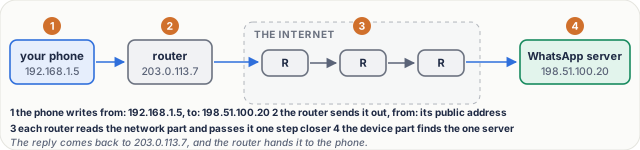
Figure 5. One message, step by step: address it, leave home, hop by hop, deliver; the reply comes back the same way.
For the curious. The addresses 203.0.113.7, 198.51.100.20 and 198.51.100.9 come from ranges reserved for examples in documentation (RFC 5737), so they belong to nobody real.
What goes wrong
- An address conflict. Your laptop and your brother's tablet both end up as 192.168.1.6: two doors with one flat number. The router can't tell them apart. Replies go to the wrong device, and both connections keep breaking.
- The fix: DHCP, short for dynamic host configuration protocol. Think of it as the building's receptionist. A new device asks: which flat can I have? DHCP picks a free number, writes it down, and never gives it to two devices at once. The number is lent, often for a day; that's called a lease. At home, DHCP runs inside your router. Most conflicts come from someone typing an address in by hand.
- A wrong address. Send to an address where no device is, and there's no door to knock on. Nothing answers, and your app gives up with a timeout.
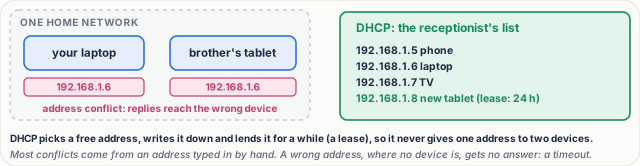
Figure 6. What goes wrong: two devices with one address on one network. The fix is DHCP, which lends each device a free address and keeps a list.
Pause and think
Your phone shows 192.168.1.5, and so does a friend's phone in another city. Is that a conflict? Decide before you open the answer.
Answer
No. Those are private addresses in two different homes: two different buildings. A conflict needs one address twice on the same network. On the internet, each home shows its own public address.

Figure 7. Two homes can both use 192.168.1.5; each shows the internet its own public address.
Common mistakes
- "Every device has its own address on the internet." No. Most devices have a private address; the internet sees the router's one public address.
- "A number in an address can be anything, like 300." No. Each number is one byte, so it is always 0 to 255; 192.168.1.300 is not a valid address.
Recap in three lines
- An IP address names a device, with a network part and a device part.
- IPv4 is four numbers from 0 to 255, 32 bits, about 4.3 billion addresses, so we also have IPv6 and private addresses.
- At home, DHCP hands out unique private addresses, and the router shows one public address.
Interview questions
Each question is tagged by kind: Basic (definitions), Scenario (apply it) and Tricky (the follow-ups interviewers use to go deeper). Each answer is what to say in about 30 seconds. Answer out loud before you open it.
What is an IP address, and what are its two parts? (Basic)
What to say in 30 seconds
An IP address identifies a device on a network: a network part plus a host part. IPv4 is 32 bits, about 4.3 billion addresses, and IPv6 is 128 bits. Private ranges, like 10 and 192.168, are reused behind one public address. DHCP leases addresses, so two devices don't clash.
What does an IPv4 address look like, and how many are there? (Basic)
What to say in 30 seconds
Four numbers from 0 to 255 separated by dots, such as 192.168.1.5. Each number is 8 bits, one byte, so an address is 32 bits, and there are 2³² = 4,294,967,296 of them, about 4.3 billion. That is not enough for every device, which is why IPv6 (128 bits) and private addresses exist.
What is the difference between a public and a private address? (Basic)
What to say in 30 seconds
A public address is unique on the internet and reachable from it. Private addresses come from three reserved ranges, 10.0.0.0/8, 172.16.0.0/12 and 192.168.0.0/16; they are reused in millions of networks and are not routed on the internet. A home router gives its devices private addresses and shows the internet one public address.
Your laptop and another device on the same Wi-Fi have the same IP address. What happens, and how is it avoided? (Scenario)
What to say in 30 seconds
An address conflict: the network cannot tell the two apart, replies reach the wrong device and both connections keep breaking. DHCP avoids it by handing out addresses from a pool, keeping a list and lending each one for a lease, so it never gives one address to two devices. Most conflicts come from an address typed in by hand.
Two phones in different cities both have 192.168.1.5. Is that a problem? (Tricky)
What to say in 30 seconds
No. Those are private addresses on two different networks. A conflict needs the same address twice on the same network. On the internet, each home shows its own public address.
What is 127.0.0.1? (Tricky)
What to say in 30 seconds
The loopback address, called localhost: it always means this same device. A program that sends to it is talking to itself, and the packets never leave the machine. The whole 127.0.0.0/8 range is reserved for loopback.
Free PDF notes
Download these notes as a printable PDF, with every picture, the real-numbers table and the interview answers: SD-N-003.pdf.
Sources
- RFC 791: Internet Protocol, IPv4 and its 32-bit addresses.
- RFC 1918: Address Allocation for Private Internets, the three private ranges.
- RFC 2131: Dynamic Host Configuration Protocol, how DHCP lends addresses with leases.
- RFC 8200: Internet Protocol, Version 6 (IPv6), the 128-bit addresses.
- RFC 5737: IPv4 Address Blocks Reserved for Documentation, the example addresses used here.
Next
Next comes lesson 4, ports and sockets: your laptop has one address but runs many apps at once, so which app gets the packet? The track overview lists the whole series.