Module 01: HTTP Protocol Basics
Why this matters
In module 00 you traced a request's journey across the network. Now we open the envelope and look at the message itself. HTTP is the language that clients and servers speak once a connection exists — and here's the part that surprises most people the first time they see it: HTTP is just text. A GET request is a few lines of human-readable ASCII you could type by hand. The web's entire application layer, the thing under every API call, every page load, every mobile-app sync, is at bottom a plain, line-based text format with a rigidly defined shape.
HTTP is a plain, line-based text format with a rigidly defined shape. Learn to read that shape and every later topic — headers, methods, status codes, caching — becomes "which line or header controls this behaviour."
Knowing that shape by heart is the single highest-leverage thing in this whole track. When you can look at a raw request/response and immediately see "that's the request line, those are headers, that blank line is the separator, everything after is the body," then every later topic — headers (02), methods (03), status codes (05), caching (06) — is just "which specific line or header controls this behavior." Engineers who never learned to read raw HTTP spend their careers guessing; engineers who did just look.
We'll build a mental model of HTTP as a stateless request/response protocol — the server treats each request as brand new, remembering nothing between them by default — and then get our hands dirty seeing and even hand-typing raw HTTP so the format stops being abstract.
Concepts
What HTTP is (and is not)
HTTP (HyperText Transfer Protocol) is an application-layer protocol:
a set of rules for how a client asks for something and how a server
answers. It rides on top of a reliable transport (usually TCP, from
module 00's step 3) — HTTP itself doesn't move bytes across the network;
TCP does that. HTTP defines what those bytes mean: "this block of text
is a request for the resource at /users using method GET."
Two properties define its personality:
- Request/response. The client sends one request; the server sends back one response. That's the entire interaction model. The server never initiates.
- Stateless. Each request is independent. The server does not, by itself, remember that the same client sent a request a moment ago. If you're logged in, that's not HTTP remembering you — it's a cookie or token you re-send on every request (a later track's topic) faking continuity on top of a fundamentally forgetful protocol. This statelessness is a feature: it's why you can put a load balancer in front of ten identical servers (module 00, step 7) and any of them can handle any request — none of them needs to "own" your session.
HTTP is stateless: each exchange is independent, and the server keeps nothing between them.
   client                         server (remembers nothing between these)
     │  ── request 1 ──────────►     │  handled fresh from request 1 alone
     │  ◄──────────── response 1 ─   │
     │                               │   ⌛ (server forgets everything)
     │  ── request 2 ──────────►     │  handled fresh from request 2 alone
     │  ◄──────────── response 2 ─   │
   each exchange is independent; continuity (login) = a token re-sent every time
The anatomy of an HTTP request
Every HTTP/1.x request has exactly this structure:
<METHOD> <request-target> <HTTP-version>   ← request line
<Header-Name>: <value>                     ← zero or more header lines
<Header-Name>: <value>
                                           ← ONE blank line (CRLF) — mandatory
<optional body bytes>                      ← message body (may be empty)
A concrete, real GET request looks exactly like this on the wire:
GET /users HTTP/1.1
Host: api.example.com
User-Agent: curl/8.5.0
Accept: application/json
Line by line:
GET /users HTTP/1.1— the request line. Method (GET), target (/users, the path), protocol version (HTTP/1.1). Three tokens, one space each.Host: api.example.com— a header. In HTTP/1.1 this one is mandatory: one IP can host many sites, so the server needs to know which hostname you meant.User-Agent/Accept— more headers (metadata; module 02 goes deep).Accept: application/jsonsays "I'd like the answer as JSON."- The blank line — a line with nothing but a line break. It is not optional and not cosmetic: it's the delimiter that says "headers are over, the body (if any) starts now." Get this wrong and the message is malformed.
- The body — for GET, usually empty. For POST/PUT it holds the payload (a JSON document, form data, an uploaded file).
A POST with a body:
POST /users HTTP/1.1
Host: api.example.com
Content-Type: application/json
Content-Length: 27

{"name": "Ada", "age": 36}
Note Content-Length: 27 — the server reads exactly 27 body bytes after
the blank line. Content-Type tells it those bytes are JSON. Together
they answer "how many bytes of body, and how should I interpret them?"
The anatomy of an HTTP response
The response mirrors the request's shape, with a status line instead of a request line:
<HTTP-version> <status-code> <reason-phrase>   ← status line
<Header-Name>: <value>                         ← headers
<Header-Name>: <value>
                                               ← blank line
<body bytes>                                    ← the actual content
A real response:
HTTP/1.1 200 OK
Content-Type: application/json
Content-Length: 52
Date: Sat, 26 Jul 2026 10:00:00 GMT

[{"id": 1, "name": "Ada"}, {"id": 2, "name": "Lin"}]
HTTP/1.1 200 OK— the status line: version, numeric status code (200), human reason phrase (OK). The number is what code reads; the phrase is for humans (module 05 covers codes thoroughly).- Headers —
Content-Type(the body is JSON),Content-Length(52 bytes of body),Date(when the server generated this). - Blank line — same mandatory separator.
- Body — the JSON array, exactly 52 bytes.
The symmetry is the point: request = (request line + headers + blank + body), response = (status line + headers + blank + body). Same skeleton.
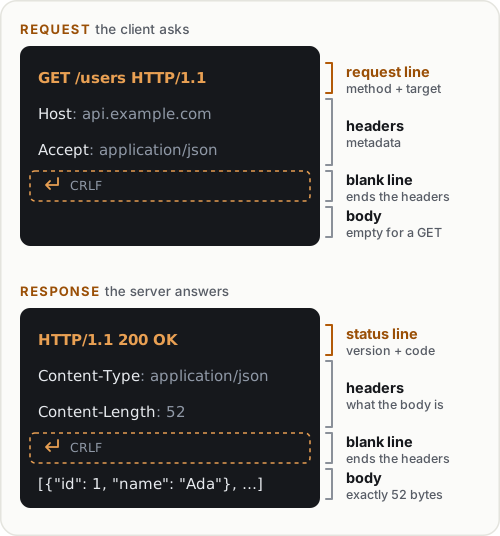
The same four parts, in the same order, in both directions. The dashed row is the blank line that ends the headers.
CRLF: the line ending that actually matters
Using \n instead of \r\n, or forgetting the blank line.
HTTP mandates CRLF, and the header section ends with a double
\r\n\r\n. Omit it and the server waits forever for more headers —
the classic "my raw request hangs" bug.
HTTP lines end with CRLF — a carriage return followed by a line feed,
written \r\n (two bytes: 0x0D 0x0A). Not just \n. The header section
ends with a blank line, which on the wire is \r\n\r\n — the CRLF that
ends the last header, immediately followed by an empty line's CRLF. When
you hand-type HTTP in exercise 5, this is the detail that trips everyone:
you must send \r\n, and you must send the double \r\n\r\n to signal
"headers done." Miss it and the server waits forever for more headers.
Stateless, and why that's liberating
Because HTTP is stateless, the server needs everything to handle a request contained in that request: which resource (the target), what to do (the method), and any context (headers — auth token, content type, what formats you accept). Nothing is implied by "the last request." This is what makes HTTP horizontally scalable: exercise 6 will show two identical servers answering the same request identically, because neither needs memory of the other. Every "session" you've experienced is that statelessness patched over by re-sending a token on each request.
One connection, many messages (a preview)
In HTTP/1.1, a single TCP connection (module 00, step 3) can carry many
request/response pairs one after another (keep-alive / persistent
connections) instead of a fresh TCP+TLS handshake per request. This is a
big performance win and the reason Connection: keep-alive exists. The
deeper story — pipelining, multiplexing, and how HTTP/2 and /3 change it —
is module 07 and module 08. For now: know that "one connection = one
request" is not generally true; connections are reused.
  without keep-alive:  [TCP+TLS setup][req/resp][close]  [TCP+TLS setup][req/resp][close]
                        └─ pay setup cost every single request ─┘

  with keep-alive:     [TCP+TLS setup][req/resp][req/resp][req/resp]...[close]
                        └─ pay setup once, reuse the pipe for many exchanges ─┘
Command reference
Ways to see, send, and hand-craft raw HTTP.
| Command / snippet | What it does |
|---|---|
curl -v URL |
Shows the raw request (>) and response (<) lines |
curl -s -D - -o /dev/null URL |
Dumps just the response headers (status line + headers) |
curl -X POST -d '{"a":1}' -H 'Content-Type: application/json' URL |
Sends a POST with a JSON body |
curl --http1.1 -v URL |
Forces HTTP/1.1 so you see classic text framing |
printf 'GET / HTTP/1.1\r\nHost: example.com\r\n\r\n' | ... |
Hand-builds a raw request byte-for-byte |
python -m http.server 8000 |
A real server that logs each request line |
http.client (Python stdlib) |
Send HTTP from code and read status/headers/body |
socket (Python stdlib) |
Send raw HTTP bytes and read the raw response |
Key options explained:
curl -v— verbose.>lines are exactly the request bytes curl put on the wire (request line + headers);<lines are the response's status line + headers; the body follows. This is the fastest way to see real raw HTTP.curl -D -(--dump-header -) — writes response headers to the given file;-means stdout. Combined with-o /dev/null(throw away the body), you get a clean look at just the status line and headers.curl -X <METHOD>sets the method;-d <data>supplies a request body (and implies POST if-Xis omitted);-Hadds a header. Together they build any request.--http1.1pins the version. curl may negotiate HTTP/2 by default over TLS; forcing 1.1 keeps the wire format in the classic text shape you're learning to read here.
Hands-on exercises
You'll need Python 3 and curl. A couple of exercises hand-type raw HTTP — that's where the format truly clicks.
1. See a real request and response
curl --http1.1 -v http://example.com/ 2>&1 | head -30
Expected: > lines showing your request (> GET / HTTP/1.1,
> Host: example.com, > User-Agent: ..., > Accept: */*, then a blank
>), and < lines showing the response (< HTTP/1.1 200 OK, headers,
blank, body). Physically point at: the request line, the mandatory Host
header, the blank line separating headers from body, the status line.
2. Isolate just the response headers
curl -s -D - -o /dev/null http://example.com/
Expected: only the status line and headers (no body). Read every header and guess what it's for; you'll confirm your guesses in module 02.
3. Stand up a server and read the request line it logs
python -m http.server 8000
In another terminal:
curl -v http://localhost:8000/ 2>&1 | grep '^>'
Expected: the server terminal logs "GET / HTTP/1.1" 200 - — that
quoted string is the request line it received. Your grep '^>' shows
the same request line from curl's side. Two views of one message.
4. Send a POST with a JSON body and inspect its framing
Point at a request echo endpoint you control. Reuse the local server?
http.server doesn't echo bodies, so hit a public echo service or just
inspect what curl sends:
curl --http1.1 -v -X POST \
  -H 'Content-Type: application/json' \
  -d '{"name": "Ada", "age": 36}' \
  http://localhost:8000/users 2>&1 | grep -E '^[>]'
Expected (the > lines): a > POST /users HTTP/1.1 request line, a
> Content-Type: application/json header, a > Content-Length: 26
header that curl computed for you, a blank >, then the body. Confirm
the Content-Length matches the byte count of your JSON.
5. Hand-type a raw HTTP request over a socket
This is the exercise that makes HTTP concrete forever. Write and run:
# raw_request.py
import socket

request = (
    "GET / HTTP/1.1\r\n"
    "Host: example.com\r\n"
    "Connection: close\r\n"
    "\r\n"                     # blank line: headers are done
)

s = socket.create_connection(("example.com", 80))
s.sendall(request.encode("ascii"))

response = b""
while True:
    chunk = s.recv(4096)
    if not chunk:
        break
    response += chunk
s.close()

print(response.decode("latin-1")[:500])
python raw_request.py
Expected: the raw response text — HTTP/1.1 200 OK, headers, a blank
line, then HTML. You just spoke HTTP by hand: no library formatted it for
you. Notice every \r\n and the mandatory blank line before the body.
Delete the blank "\r\n" line and rerun — it hangs (the server waits for
headers that never end), proving the blank line is load-bearing.
6. Prove statelessness
Run two servers on different ports from two different directories:
mkdir -p /tmp/a /tmp/b && echo A > /tmp/a/x.txt && echo B > /tmp/b/x.txt
(cd /tmp/a && python -m http.server 8001) &
(cd /tmp/b && python -m http.server 8002) &
curl -s http://localhost:8001/x.txt
curl -s http://localhost:8002/x.txt
Expected: A then B. Now hit 8001 twice: curl -s http://localhost:8001/x.txt; curl -s http://localhost:8001/x.txt →
A then A. Neither request "remembers" the other; each is handled
fresh from the request alone. That independence is exactly what lets a
load balancer (module 00) route any request to any identical backend.
(Stop the servers: kill %1 %2.)
7. Read the status line programmatically
# read_status.py
import http.client
conn = http.client.HTTPConnection("example.com", 80)
conn.request("GET", "/")
resp = conn.getresponse()
print("version:", resp.version)     # 11 means HTTP/1.1
print("status:", resp.status)       # 200
print("reason:", resp.reason)       # OK
print("content-type:", resp.getheader("Content-Type"))
conn.close()
Expected: version: 11, status: 200, reason: OK, and a content type.
This is the status line (module 05's subject) parsed into fields by the
library — the same three tokens you read by eye in exercise 1.
8. Diagnose and fix: a malformed raw request
Run this broken version and figure out why it fails:
# broken_request.py
import socket

# BUG is in here somewhere
request = (
    "GET / HTTP/1.1\n"          # note: \n, not \r\n
    "Host: example.com\n"
    "Connection: close\n"
)   # note: no final blank line

s = socket.create_connection(("example.com", 80))
s.sendall(request.encode("ascii"))
s.settimeout(5)
try:
    print(s.recv(4096).decode("latin-1")[:300] or "(empty)")
except socket.timeout:
    print("TIMED OUT waiting for a response")
s.close()
python broken_request.py
Expected: it times out or returns nothing/garbage. Diagnose: two bugs
— (1) it uses bare \n instead of CRLF (\r\n) for line endings, and
(2) it never sends the mandatory blank line (\r\n\r\n), so the server
thinks more headers are still coming and waits. Fix by rewriting the
request exactly like exercise 5's (proper \r\n endings and a trailing
blank line) and rerun — you should now get HTTP/1.1 200 OK .... Lesson:
the byte-level format is strict; the blank-line terminator and CRLF are
not suggestions.
Independent challenge
No code given — build it from what you know.
Task: Using only Python's socket module (no http.client, no
requests, no framework), write a program that opens a raw connection to
a public HTTP server (port 80) and retrieves a resource, then parses the
raw response yourself into three parts: the status line (extract the
numeric status code and reason phrase), the headers (as a dictionary),
and the body. Print each part separately. You must find the boundary
between headers and body without a library's help. Verify your parsed
Content-Length header matches the actual number of body bytes you
received. This directly builds on exercise 5's raw request and the
response anatomy from the Concepts section — and it's the parsing half of
what you'll do for real in module 12's capstone.
Hint
The header/body boundary on the wire is the byte sequence \r\n\r\n
(module 01's blank line). Split the raw bytes on the first occurrence of
b"\r\n\r\n": everything before is the status line + headers, everything
after is the body. Then split the header block on \r\n, take the first
line as the status line, and split each remaining line on the first
": " into key/value.
Common mistakes & troubleshooting
- Using
\ninstead of\r\n. HTTP mandates CRLF. Many servers are lenient, but strict ones (and the spec) require\r\n; hand-crafted requests that use bare\ncan hang or be rejected. - Forgetting the blank line. The double
\r\n\r\nthat ends the header section is mandatory. Omit it and the server waits forever for more headers — the classic "my raw request hangs" bug. - Omitting
Hostin HTTP/1.1. It's mandatory; without it, name-based virtual-hosted servers can't tell which site you meant and return400 Bad Request. Content-Lengthnot matching the body. If it's too large the server waits for bytes that never come; too small and the body is truncated. Let tools compute it (curl -ddoes) unless you're doing it by hand deliberately.- Expecting the server to remember you. HTTP is stateless; "logged in" means you re-send a cookie/token every request. Nothing carries over implicitly.
- Assuming one request per connection. HTTP/1.1 reuses connections (keep-alive). Don't assume a new TCP connection per request when reasoning about performance.
Checkpoint quiz
Write down your answer to each question before expanding it — checking without attempting first is the single easiest way to fool yourself into thinking you've learned this.
- Write out, line by line, a minimal valid HTTP/1.1 GET request for
/healthon hostapi.example.com. What single header is mandatory? - What exactly separates the headers from the body in an HTTP message, and what are its literal bytes?
- What does "HTTP is stateless" mean, and how do logged-in sessions work despite it?
- In the request line
POST /users HTTP/1.1, name the three tokens and what each is. - A server has
Content-TypeandContent-Lengthin a response. What question does each one answer for the client? - You hand-craft a raw request over a socket and it just hangs with no response. Name the two most likely format mistakes.
- Why does statelessness make it easy to put ten identical servers behind one load balancer?
Answers
(request line, theGET /health HTTP/1.1 Host: api.example.comHostheader, then a blank line).Hostis the mandatory header in HTTP/1.1.- A blank line — on the wire, a CRLF immediately following the previous
line's CRLF, i.e. the byte sequence
\r\n\r\n. - The server keeps no memory of prior requests by default; each request is self-contained. Sessions work by the client re-sending a cookie or token on every request, which the server uses to look up who you are.
POST= the method (what to do);/users= the request target/path (which resource);HTTP/1.1= the protocol version.Content-Typeanswers "how should I interpret the body bytes?" (e.g. JSON, HTML).Content-Lengthanswers "how many body bytes are there?"- Using
\ninstead of\r\nline endings, and/or omitting the final blank line (\r\n\r\n) that terminates the header section — the server keeps waiting for more headers. - Because each request carries everything needed to handle it and no server holds session state locally, any of the identical servers can handle any request identically — so the load balancer can route freely.
Further reading & sources
- MDN: An overview of HTTP - a clear description of HTTP as a stateless, text-based request/response protocol.
- MDN: HTTP Messages - the exact request-line/status-line/headers/body anatomy this module drills.
- RFC 9112: HTTP/1.1 message syntax - the authoritative wire format, including CRLF and the blank-line terminator.
- RFC 9110: HTTP Semantics - version-independent meaning of methods, headers, and status; your reference for the rest of the track.
- MDN: Connection management in HTTP/1.x - keep-alive and persistent connections previewed at the end of this module.
- Point at the request line, the headers, the blank line and the body in a raw HTTP message, and say what each one is for
- Explain why the blank line is mandatory and what happens without it
- Say what "stateless" costs you, and what it buys — and how a login works on top of a protocol that remembers nothing
- Hand-type a valid GET request over a socket, CRLFs and all
Free PDF notes
Download these notes as a printable PDF, with every diagram and interview questions: SD-B-010: HTTP Fundamentals. Each section in one file: Phase 2, Networking (PDF).
Next
02-http-headers-deep-dive — you kept seeing headers in every raw message above; now we categorize them all and learn what each family is actually for.