Lesson 16: DNS Part 2, Records, TTL and Safe Migrations
Roadmap
You are in System Design Interview Prep, Track 02, Networking from Zero: lesson 16 of 30. It follows lesson 15, where one DNS lookup was traced step by step. Here we look at what DNS stores, how long answers are cached, and how to change DNS safely. The next lesson, DNS traffic management, is coming soon. See the track overview for the whole plan.
These are the written notes for the lesson's video. Prefer paper? The same notes are a free, printable PDF: download SD-N-016.pdf.
Concept
DNS stores records (A, AAAA, CNAME, MX, TXT, NS); every answer is cached for its TTL; to change safely, lower the TTL early, wait out the old TTL, switch while both servers run, then raise the TTL.
Words you'll meet today
| Word | In plain words |
|---|---|
| A / AAAA record | a name pointing to an IPv4 / IPv6 address |
| CNAME | an alias: this name is really that other name |
| MX record | where email for the domain goes, with a priority |
| TXT record | free text, used to prove ownership and for email security |
| NS record | which servers are authoritative for the domain |
| TTL | time to live: how long an answer may be cached, in seconds |
| Authoritative server | the server that holds the real records for a domain |
| Negative caching | caching a “no such name” answer too |
The question: why do some users still see the old site?
You move your website to a new server and update DNS. Half your users see the new site; the other half still reach the old one, for hours. Nothing is broken. In lesson 15 we followed one DNS lookup. Today: what DNS actually stores, the records, and the one number that decides how long the world remembers them, the TTL. Then, how to change DNS without anyone noticing.
An everyday picture first: a number on sticky notes
Your friend's phone number is written on sticky notes all over town, and each note also says: check again in one hour. Your friend changes their number. People who check their note within the hour still call the old number; then they check again and get the new one. If the note had said one week, some people would call the old number for a week. Nothing is broken: they're using what they wrote down. The sticky note is a DNS cache, and “check again in one hour” is the TTL.

Figure 1. The analogy: a phone number copied onto sticky notes that say “check again in 1 hour”. The note is a DNS cache and the reminder is the TTL.
DNS records
The records for backendroadmap.com live on its authoritative servers. Each record has four parts: a name, a type, a TTL and a value.
- A: backendroadmap.com, type A, TTL 3,600, value 198.51.100.10, the IPv4 address. AAAA does the same for an IPv6 address.
- CNAME: an alias. www.backendroadmap.com CNAME backendroadmap.com means: look up that other name instead. It's how you point a name at a CDN or a cloud load balancer whose addresses change.
- MX: where email for the domain goes, with a priority number; lower goes first.
- TXT: free text, used to prove you own a domain and for email security.
- NS: which servers are authoritative for the domain.
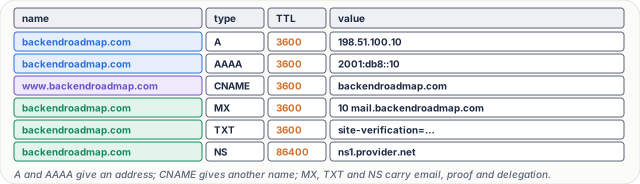
Figure 2. The six records you'll see most: A and AAAA give an address, CNAME gives another name, and MX, TXT and NS carry email, proof of ownership and delegation. Each record has a name, a type, a TTL and a value.
One rule: a CNAME can't sit at the top of a domain next to other records. Many DNS providers offer a special alias record for that case.

Figure 3. A CNAME is an alias: the resolver follows it to another name and looks that up. It can't sit at the top of a domain next to other records.
The TTL
Every answer carries a TTL, in seconds; 3,600 means one hour. The resolver caches the answer and counts down, and until it reaches zero it won't ask again.

Figure 4. The TTL: every DNS answer carries a time to live in seconds; a resolver caches the answer and only asks again when the countdown reaches zero.
Real numbers. A TTL of 300 is five minutes; 86,400 is one day. A short TTL means changes spread fast, but more lookups, and each lookup can add 20 to 100 ms. A long TTL means fewer lookups, but a change can take a whole day to reach everyone.
So the famous line, “DNS changes take 48 hours to propagate”, isn't quite right. The new record is live on the authoritative server at once. What you're waiting for is old copies, in caches, running out their TTL.

Figure 5. Short versus long TTLs: short ones spread changes fast but cost more lookups; long ones save lookups but make a change take up to a day.
A safe migration, step by step
- Days before the move, lower the TTL, from one day to five minutes.
- Wait at least the old TTL, a full day, so every cache now holds the short one.
- Keep the old server running and change the A record to the new address. Within about five minutes, most users move.
- Watch traffic on the old server fall to almost zero, and keep it alive a little longer for slow caches.
- When everything is stable, raise the TTL again, say to one hour.
And the bonus: for the whole move, rolling back takes only five minutes.

Figure 6. A safe DNS migration: lower the TTL, wait at least the old TTL, switch the record while both servers run, watch traffic move, then raise the TTL again.
What goes wrong
- Skipping step 2. You lower the TTL and change the address at the same time; caches still hold the old answer with its old TTL, up to a full day.
- Switching the old server off too early. Users with the old answer cached get errors until their cache expires.
- A typo in a record with a long TTL. The mistake is cached everywhere for a day. Short TTLs during changes make mistakes cheap.
- Negative caching. Even “not found” is cached: look up a name before you create it, and the “no such name” answer is remembered too.
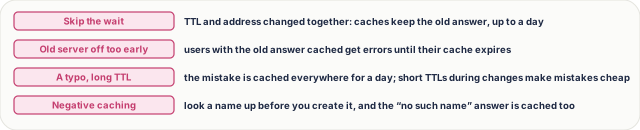
Figure 7. What goes wrong with DNS changes: skipping the wait, switching the old server off too early, a typo cached under a long TTL, and negative caching of a name that didn't exist yet.
Pause and think
Your A record has a TTL of one day. You lower it to five minutes and change the address in the same minute. How long until every user reaches the new server? Decide before you open the answer.
Answer
Up to a day. A resolver that cached the old record just before your change keeps it for its full 86,400 seconds; it never saw the new five-minute TTL. Lowering the TTL only helps once the old TTL has run out.

Figure 8. The pause-and-think answer: changing the address in the same minute as lowering the TTL still leaves caches holding the old answer for up to a day.
Common mistakes
- "DNS changes take 48 hours." No. Caches expire by TTL; with planning, the move takes minutes.
- "A shorter TTL is always better." No. It means more lookups, more load and a little more latency. Keep it short around changes, longer the rest of the time.
- "A CNAME is a redirect." No. The address bar doesn't change; DNS just follows one name to another. An HTTP redirect is different (lesson 19).
Recap in three lines
- DNS stores records: A, AAAA, CNAME, MX, TXT and NS.
- Every answer is cached for its TTL.
- To change safely: lower the TTL early, wait out the old TTL, switch, keep the old server, then raise the TTL.
Interview questions
Name the common DNS record types and what they do. (Basic)
What to say in 30 seconds
A maps a name to an IPv4 address and AAAA to an IPv6 address; CNAME makes a name an alias of another name; MX lists mail servers with priorities; TXT holds text such as ownership proofs and SPF/DKIM for email; NS names the authoritative servers for a domain. Each record also carries a TTL.
What is a TTL in DNS, and what's the trade-off in choosing it? (Basic)
What to say in 30 seconds
The time, in seconds, a resolver may cache an answer before asking again. A short TTL (like 300) makes changes reach users fast but causes more lookups and a little more latency; a long TTL (like 86,400) saves lookups but makes changes take up to that long.
How do you move a website to a new IP address with no downtime? (Scenario)
What to say in 30 seconds
Days before, lower the record's TTL, say from a day to five minutes, and wait at least the old TTL so every cache holds the short one. Switch the A record while both old and new servers run, watch traffic move to the new one, keep the old server a little longer for slow caches, then raise the TTL again. Rollback is quick throughout.
Users still reach the old server hours after a DNS change. Why, and what can you do? (Scenario)
What to say in 30 seconds
Resolvers cached the old answer with its old TTL and will keep it until that expires; some resolvers and clients also hold answers longer. You can't flush other people's caches, so keep the old server running (or proxying to the new one) until traffic drains, and lower TTLs ahead of time next time.
What's the difference between a CNAME and an HTTP redirect? (Tricky)
What to say in 30 seconds
A CNAME is resolved inside DNS: the resolver follows the alias to another name and returns its address, and the browser's URL doesn't change. An HTTP redirect (301 or 302) is the web server telling the browser to request a different URL, so the address bar changes.
Why can't you put a CNAME at the root of a domain? (Tricky)
What to say in 30 seconds
A CNAME means the name has no other data of its own, but the root (apex) must have NS and SOA records, and usually MX and TXT. So DNS forbids a CNAME there. Providers offer ALIAS or ANAME records, or CNAME flattening, which resolve the target themselves and return its addresses as A and AAAA records.
Free PDF notes
Download these notes as a printable PDF, with every picture, the migration checklist and the interview answers: SD-N-016.pdf.
Sources
- RFC 1034: Domain Names, Concepts and Facilities, records, zones, caching and TTL.
- RFC 1035: Domain Names, Implementation and Specification, record types and formats.
- RFC 2308: Negative Caching of DNS Queries, caching “no such name” answers.
- RFC 3596: DNS Extensions to Support IPv6, the AAAA record.
- RFC 7208: Sender Policy Framework, email security in TXT records.
Next
Next comes lesson 17, DNS traffic management: how one name can send each user to the nearest, healthiest server (coming soon). Until then, the track overview lists the whole series.