# Lesson 01: What Is a Network? Clients, Servers and the Conversation Between Them
## Roadmap
You are in **System Design Interview Prep**, Track 02, **Networking from Zero**: lesson 1 of 30, the very first one. It needs nothing before it. The next lesson is [packets](../02-packets/README.md). See [the track overview](../README.md) for the whole plan.
These are the written notes for the lesson's video. Prefer paper? The same notes are a free, printable PDF: [download SD-N-001.pdf](https://backendroadmap.com/notes/system-design/SD-N-001.pdf).
## Concept
> [!key] A network links devices so they can send messages. A client asks with a request; a server does the work and answers with a response. Every round trip costs time, and when no answer comes, a timeout and a safe retry keep things moving.
## Words you'll meet today
| Word | In plain words |
|---|---|
| **Network** | devices linked so they can send messages |
| **Internet** | a network of networks |
| **Client** | the one who asks (your phone's app, a browser) |
| **Server** | the one who answers: a computer that waits for requests |
| **Request** | the question the client sends |
| **Response** | the answer that comes back |
| **Round trip** | a request going there plus its response coming back |
| **Millisecond (ms)** | a thousandth of a second |
| **Timeout** | "I waited too long": the client gives up |
| **Retry** | send the same request again |
## The question: who talked to whom?
You open the Flipkart app, type *running shoes* and tap Search. Half a second later, a page full of shoes appears on your screen. But those shoes were never on your phone. So where did they come from? Who talked to whom, and what did they say? That conversation is what a network is for.
A **network** is devices linked so they can send messages to each other. Your home Wi-Fi is a small one: it links your phone, your laptop and your TV. The **internet** is many networks joined together, a network of networks. To reach a computer in another city, your message passes through several of them.
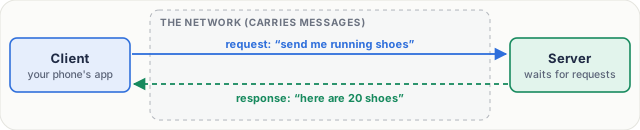
*Figure 1. A network lets devices send messages. The client asks with a request; the server answers with a response.*
## An everyday picture first: a restaurant
You sit at a table, hungry. But you don't walk into the kitchen; you call the waiter. You order one masala dosa, and the waiter carries your order to the kitchen. The kitchen does the work and cooks the dosa. Then the waiter carries the plate back to your table. You asked, and you got an answer.
Notice two things:
- **You always speak first.** The kitchen never sends food nobody ordered.
- **One kitchen cooks for many tables** at the same time.
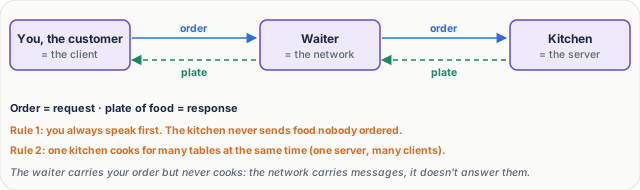
*Figure 2. The everyday picture: customer, waiter and kitchen are client, network and server.*
## Now the real thing
| In the restaurant | In a network |
|---|---|
| You, the customer | the **client**: the Flipkart app on your phone |
| The kitchen | the **server**: a computer in a data centre that waits for requests |
| Your order | the **request** |
| The plate of food | the **response** |
| The waiter, carrying both ways | the **network** |
The same rules hold. The client always speaks first. And one server answers many clients at once, thousands of phones in the same second.
## Step by step: one request
Let's follow one request, slowly. Each step has a job.
1. **Ask.** You tap Search. The app writes a request: send me shoes that match *running shoes*. Its job is to say exactly what you want.
2. **Travel.** The request goes from your phone, over Wi-Fi or mobile data, through several networks, to Flipkart's server. The network's job is to carry the message. It doesn't answer it.
3. **Work.** The server finds matching shoes, with prices and photos. The thinking happens here, not on your phone.
4. **Answer.** The server sends a response: here are twenty shoes. It travels back across the networks to your phone.
5. **Show.** The app reads the response and draws it on your screen.
One request, one response: a conversation of two messages.
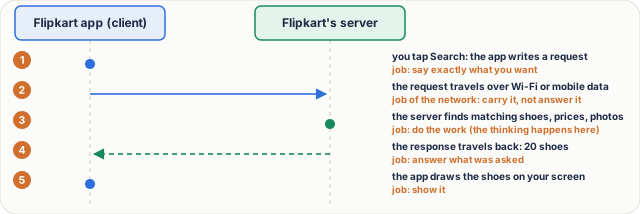
*Figure 3. One request, step by step. Each step has a job: ask, carry, work, answer, show.*
## Real numbers: round trips add up
The time for a request to go and its response to come back is a **round trip**. On a mobile network, **50 milliseconds** is common; a millisecond is a thousandth of a second.
Here's the catch: a shopping page is not one response. A **3 MB** page is made of about **40 files**: the page itself, photos, styles and code. Each file is its own request and response.
| How the files are fetched | Arithmetic | Waiting on round trips |
|---|---|---|
| one after another | 40 × 50 ms | **2,000 ms = 2 seconds** |
| six at a time | 40 ÷ 6 ≈ 7 rounds; 7 × 50 ms | **350 ms** |
So apps and browsers ask for several files at once. Fewer round trips, a faster page.
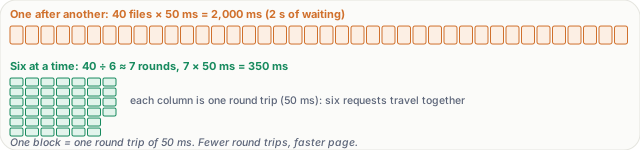
*Figure 4. Real numbers: a 3 MB page of about 40 files, at 50 ms per round trip.*
> [!note] **For the curious.** Round trips are only half the cost; moving the bytes takes time too. 3 MB is 24 megabits (1 byte = 8 bits), so on a 20 megabit-per-second connection the data alone takes 24 ÷ 20 = 1.2 seconds. Browsers really do fetch several files at once: with HTTP/1.1 they open about six connections per site, and HTTP/2 (lesson 23) sends many requests over one connection.
## What goes wrong: no answer
It's 10 in the morning, and Tatkal booking opens on IRCTC. Lakhs of phones send requests in the same minute. The server is busy. A busy server may answer slowly, or answer "I'm busy, try again later". Worse, sometimes no answer comes at all: the server may have crashed, or a message was lost on the way.
The client can't wait forever. So it starts a timer. If no response arrives in, say, 10 seconds, it gives up. That's a **timeout**: "I waited too long". The app shows "something went wrong, please try again".
How does the design cope?
1. **Timeouts**, so the app never hangs forever.
2. **Retries, after a short wait**, so a busy server isn't hit even harder.
3. **A retry must be safe.** Asking twice for a list of trains is harmless. Paying twice is not. How systems handle that comes later in the course.
4. **More servers.** Like a restaurant opening more kitchens, a big site runs many servers that share the requests.
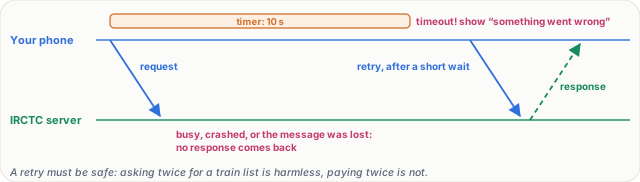
*Figure 5. What goes wrong: no response comes. The client's timer runs out (a timeout), and it retries safely after a short wait.*
## Pause and think
> [!exercise] You send "hi" to a friend on WhatsApp. Who is the client? Who is the server? And is your friend's phone a server? Decide before you open the answer.
Answer
Your phone is a client. It sends a request to WhatsApp's server. The server holds the message and delivers it to your friend's phone, which is a client too. The two phones don't talk directly; they talk through the server.

*Figure 6. Both phones are clients; the WhatsApp server sits in the middle.*
What to say in 30 seconds
A network connects devices so they can exchange messages. In the client-server model, the client starts with a request, and the server, which waits for requests, does the work and returns a response. Each request costs at least one round trip, so good designs cut round trips. Servers get busy and messages get lost, so clients use timeouts and safe retries, and we add servers to share the load.
What to say in 30 seconds
No. A server is a role: any computer running a program that waits for requests. A laptop can be a server. Client and server describe who asks and who answers, not the hardware.
What to say in 30 seconds
One by one: 40 × 50 ms = 2,000 ms, two seconds of waiting before counting the time to move any data. Six at a time: about 7 rounds, 7 × 50 = 350 ms. That's why designs try to cut round trips.
What to say in 30 seconds
Never wait forever: use a timeout, then retry after a short, growing wait so the busy server isn't hit even harder, and only retry requests that are safe to repeat. On the server side, add servers to share the load.
What to say in 30 seconds
No. Both phones are clients. Your phone sends the message to WhatsApp's server, which holds it and delivers it to your friend's phone. The phones don't talk directly.
What to say in 30 seconds
Because a timeout doesn't tell you whether the server did the work. The request may have succeeded and only the response was lost. Asking twice for a train list is harmless; paying twice is not, so such requests need protection against duplicates.