 Vertical Scaling Explained: When to Scale Up (and Its 4 Limits)
Lesson 06: Vertical Scaling
Roadmap
You are in System Design Interview Prep, Track 01, Core Fundamentals: lesson 6 of 19 (make one machine bigger, and know when to stop). It builds on Lesson 05: Trade-offs and How to Justify a Design. Next comes Lesson 07: Horizontal Scaling.
These are the written notes for the lesson's video. Prefer paper? The same notes are a free, printable PDF: download SD-A-006.pdf.
Concept
Vertical scaling (scaling up) gives one machine more CPU, memory or faster disks: no code changes and quick relief, but it hits a ceiling, gets expensive and stays a single point of failure.
Explanation
What it is
Scaling up means making one machine more powerful: more CPU cores, more RAM, faster storage (for example moving to NVMe SSDs), a faster network card. Your code doesn't change; the same app simply runs on stronger hardware. In the cloud it's often one setting: change the instance type and restart.
A worked example
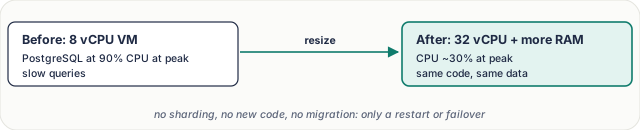
Figure 1. A database at its limit, fixed by resizing the machine.
The PostgreSQL VM has 8 vCPUs and sits at 90% CPU at peak. Resizing to 32 vCPUs and more memory brings CPU to ~30%, and more of the working set now fits in memory, so queries hit the disk less. Four times the cores rarely means four times the speed (locks, single-threaded parts and I/O limit the gain), but it buys a lot of headroom fast.
The four limits

Figure 2. Why scaling up is a first step, not a final answer.
- Hardware ceiling. Even the largest instance has a maximum number of cores and memory. Past it, you can't go higher.
- Steep cost curve. The biggest and high-memory machines carry a premium, while software rarely uses every extra core well. Each extra unit of performance costs more.
- Single point of failure. Everything still lives on one machine. If it fails, the service is down.
- Downtime to resize. Changing size usually means a restart, unless you first fail over to a replica and resize the old primary.
When it's the right move
| Situation | Why scaling up fits |
|---|---|
| You need relief today | One setting, no code or data changes |
| Stateful, hard-to-split workloads | A relational database with joins and transactions works best on one node |
| You're still small | One big machine is simpler than a cluster to run |
| Buying time | Gives you months to plan replicas, caching or sharding properly |
Scale up vs scale out. Scale up first for stateful parts and early-stage systems; scale out for stateless tiers and when you need fault tolerance or growth beyond one machine. Most real systems do both: a big primary database plus many small app servers.
Key terms
| Term | Meaning |
|---|---|
| Vertical scaling | a bigger machine (scale up) |
| Horizontal scaling | more machines (scale out) |
| vCPU | a virtual CPU core in the cloud |
| Working set | data accessed often; best kept in RAM |
| Failover | switching to a standby |
| Headroom | spare capacity for spikes |
Interview questions
Each question is tagged by kind: Basic (definitions), Scenario (apply it to a system) and Tricky (the follow-ups interviewers use to go deeper). Answer out loud before you open the answer.
When would you scale vertically instead of horizontally? (Basic)
What a strong answer covers
Early on, for stateful systems like a relational database, and when you need a quick fix without code changes. It buys time to plan horizontal scaling properly.
What are the limits of vertical scaling? (Basic)
What a strong answer covers
A hardware ceiling, a steep cost curve, a single point of failure, and downtime during resize unless you fail over first.
Does vertical scaling improve availability? (Basic)
What a strong answer covers
No. It's still one machine, so one failure takes the service down. Availability needs redundancy: a replica and failover.
Your database is at 90% CPU at peak. What do you do this week? (Scenario)
What a strong answer covers
Check for slow queries and missing indexes first (often the cheapest fix), then resize the instance via a replica failover. In parallel, plan read replicas or caching for growth.
How do you resize a production database with minimal downtime? (Scenario)
What a strong answer covers
Create or use a replica, resize it, promote it to primary (a few seconds of failover), then resize or replace the old primary as the new replica.
Doubling the cores only gave 30% more throughput. Why? (Scenario)
What a strong answer covers
Something else is the bottleneck: lock contention, a single-threaded part, disk I/O or the network. Amdahl's Law: the serial part limits the gain from more parallel hardware.
Is “just get a bigger machine” ever the best senior answer? (Tricky)
What a strong answer covers
Yes, when it's the fastest, cheapest way to meet the requirement and the growth forecast fits under the ceiling. Say so, and name the trigger for moving to horizontal scaling.
Why are high-memory instances so expensive per GB? (Tricky)
What a strong answer covers
They're specialised hardware made in smaller volumes, and cloud pricing at the top end includes a premium. Performance per dollar falls as size grows.
Common mistakes & troubleshooting
- Dismissing vertical scaling as “not scalable”: it's often the cheapest first fix.
- Scaling up forever and discovering the ceiling during a traffic spike.
- Forgetting it doesn't improve availability.
- Resizing the primary without a replica to fail over to.
Free PDF notes
Download these notes as a printable PDF, with every diagram: SD-A-006.pdf. All Phase 1 notes in one file: Phase 1, Core Fundamentals (PDF).
Next
Continue with Lesson 07: Horizontal Scaling.