# Lesson 04: Non-Functional Requirements
## Roadmap
You are in **System Design Interview Prep**, Track 01, **Core Fundamentals**: lesson 4 of 19 (how well the system must work, as numbers). It builds on [Lesson 03: Functional Requirements](../03-functional-requirements/README.md). Next comes [Lesson 05: Trade-offs and How to Justify a Design](../05-trade-offs-and-how-to-justify-a-design/README.md).
These are the written notes for the lesson's video. Prefer paper? The same notes are a free, printable PDF: [download SD-A-004.pdf](https://backendroadmap.com/notes/system-design/SD-A-004.pdf).
## Concept
> [!key] Non-functional requirements are the quality targets (latency, availability, consistency, durability, scale, cost); written as numbers, they decide the architecture.
## Explanation
### Same features, different systems
Two systems can have identical features and still need completely different architectures. A personal blog and a bank both “store and show data”; what separates them is **how well** they must do it. Those are the non-functional requirements (NFRs), also called quality attributes:
| Attribute | Question it answers | Example target |
|---|---|---|
| **Scale** | How much load? | 10,000 RPS peak, 500 M users |
| **Latency** | How fast for one request? | p99 < 200 ms |
| **Availability** | How often up? | 99.9% per month |
| **Consistency** | Must every read be the latest? | Strong for balances, eventual for likes |
| **Durability** | Can data ever be lost? | No acknowledged write lost |
| **Security, cost, compliance** | Who can access, at what price, under which rules? | Encrypted at rest, budget, GDPR |
### Turn every adjective into a number
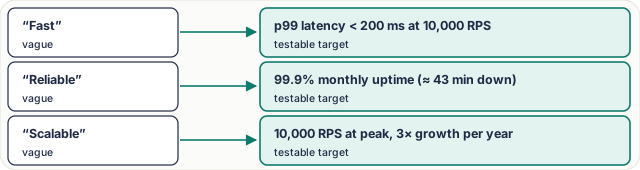
*Figure 1. “Fast, reliable, scalable” mean nothing in a design review. A number can be tested and designed for.*
### Why p99, not the average
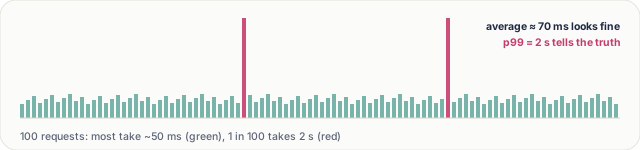
*Figure 2. The average hides the slow tail; p99 shows what 1 user in 100 waits.*
A page often makes 20–50 backend calls, so a user hits the p99 latency of some call on almost every page load. That's why targets use percentiles (p50, p95, p99) measured at a stated load, not averages.
### The nines, in downtime
| Availability | Downtime per year | Per month | Typically needs |
|---|---|---|---|
| **99%** | ~3.65 days | ~7.3 h | One server, restarts by hand |
| **99.9%** | ~8.8 h | ~43 min | Redundant servers, health checks |
| **99.99%** | ~53 min | ~4.3 min | Multiple zones, automatic failover |
| **99.999%** | ~5.3 min | ~26 s | Multiple regions, heavy automation |
Each extra nine costs much more to build and run, so ask what the business really needs.
### Numbers change the architecture
- **High availability** → replicas across availability zones, automatic failover.
- **Low latency worldwide** → caches and a CDN near users, regional deployments.
- **Strong consistency** → a single source of truth or quorum writes; slower writes accepted.
- **High durability** → synchronous replication, backups, write-ahead logs.
> [!example] **Worked example: a payment system.** The features are simple: charge a card, record the payment. The NFRs dominate: **strong consistency** (money is never double counted), **durability** (a confirmed payment is never lost), **idempotency** (a retried charge doesn't charge twice) and **auditability** (every change is traceable). Here correctness beats raw speed: 300 ms is fine, a lost payment is not.
## Key terms
| Term | Meaning |
|---|---|
| **NFR / quality attribute** | how well, not what |
| **p99 latency** | 99% of requests are faster |
| **SLO** | an internal target, e.g. 99.9% |
| **SLA** | a promise to customers, with penalties |
| **Durability** | acknowledged data is never lost |
| **Idempotency** | a retry has no extra effect |
## Interview questions
Each question is tagged by kind: **Basic** (definitions), **Scenario** (apply it to a system) and **Tricky** (the follow-ups interviewers use to go deeper). Answer out loud before you open the answer.
> [!interview] Which non-functional requirements change the architecture most? (Basic)
What a strong answer covers
Availability, latency, consistency, durability and scale, because each forces specific components: replicas and failover, caches and CDNs, quorums, synchronous replication, sharding.
What a strong answer covers
As a percentile at a stated load: “p99 under 200 ms at 10,000 RPS”. Averages hide the slow tail that real users hit.
What a strong answer covers
About 43 minutes a month, or 8.8 hours a year. 99.99% allows about 4.3 minutes a month.
What a strong answer covers
Very high availability (redirects are almost all traffic and links live in emails and printed media), low latency (p99 under ~100 ms), and high read scale; eventual consistency for a newly created link is usually fine.
What a strong answer covers
Turn it into a number with a cost: 99.99% means multi-zone redundancy and automatic failover; 99.999% means multi-region and much more spend. Ask what an hour of downtime costs the business, then pick.
What a strong answer covers
Strong consistency, durability of confirmed payments, idempotent APIs, auditability, high availability for accepting payments, PCI-DSS compliance; moderate latency is acceptable.
What a strong answer covers
A page makes many calls, often in sequence. With 30 calls, the chance at least one hits its p99 is about 26%, and sequential calls add up. Use latency budgets per call and parallelise.
What a strong answer covers
Yes, and it usually should. A shop needs exact stock and payments (strong) but can show reviews and recommendations a few seconds late (eventual).