 Non-Functional Requirements: p99 Latency, 99.9% Uptime & Payments
Lesson 04: Non-Functional Requirements
Roadmap
You are in System Design Interview Prep, Track 01, Core Fundamentals: lesson 4 of 19 (how well the system must work, as numbers). It builds on Lesson 03: Functional Requirements. Next comes Lesson 05: Trade-offs and How to Justify a Design.
These are the written notes for the lesson's video. Prefer paper? The same notes are a free, printable PDF: download SD-A-004.pdf.
Concept
Non-functional requirements are the quality targets (latency, availability, consistency, durability, scale, cost); written as numbers, they decide the architecture.
Explanation
Same features, different systems
Two systems can have identical features and still need completely different architectures. A personal blog and a bank both “store and show data”; what separates them is how well they must do it. Those are the non-functional requirements (NFRs), also called quality attributes:
| Attribute | Question it answers | Example target |
|---|---|---|
| Scale | How much load? | 10,000 RPS peak, 500 M users |
| Latency | How fast for one request? | p99 < 200 ms |
| Availability | How often up? | 99.9% per month |
| Consistency | Must every read be the latest? | Strong for balances, eventual for likes |
| Durability | Can data ever be lost? | No acknowledged write lost |
| Security, cost, compliance | Who can access, at what price, under which rules? | Encrypted at rest, budget, GDPR |
Turn every adjective into a number
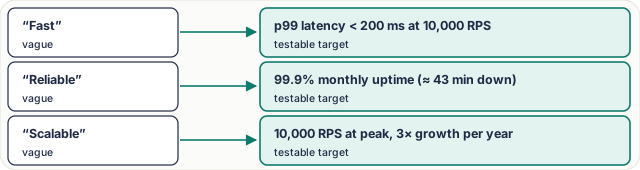
Figure 1. “Fast, reliable, scalable” mean nothing in a design review. A number can be tested and designed for.
Why p99, not the average
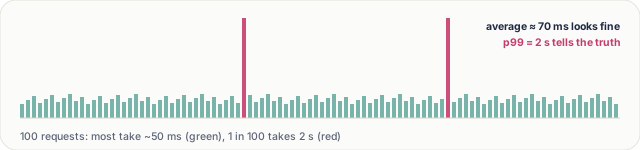
Figure 2. The average hides the slow tail; p99 shows what 1 user in 100 waits.
A page often makes 20–50 backend calls, so a user hits the p99 latency of some call on almost every page load. That's why targets use percentiles (p50, p95, p99) measured at a stated load, not averages.
The nines, in downtime
| Availability | Downtime per year | Per month | Typically needs |
|---|---|---|---|
| 99% | ~3.65 days | ~7.3 h | One server, restarts by hand |
| 99.9% | ~8.8 h | ~43 min | Redundant servers, health checks |
| 99.99% | ~53 min | ~4.3 min | Multiple zones, automatic failover |
| 99.999% | ~5.3 min | ~26 s | Multiple regions, heavy automation |
Each extra nine costs much more to build and run, so ask what the business really needs.
Numbers change the architecture
- High availability → replicas across availability zones, automatic failover.
- Low latency worldwide → caches and a CDN near users, regional deployments.
- Strong consistency → a single source of truth or quorum writes; slower writes accepted.
- High durability → synchronous replication, backups, write-ahead logs.
Worked example: a payment system. The features are simple: charge a card, record the payment. The NFRs dominate: strong consistency (money is never double counted), durability (a confirmed payment is never lost), idempotency (a retried charge doesn't charge twice) and auditability (every change is traceable). Here correctness beats raw speed: 300 ms is fine, a lost payment is not.
Key terms
| Term | Meaning |
|---|---|
| NFR / quality attribute | how well, not what |
| p99 latency | 99% of requests are faster |
| SLO | an internal target, e.g. 99.9% |
| SLA | a promise to customers, with penalties |
| Durability | acknowledged data is never lost |
| Idempotency | a retry has no extra effect |
Interview questions
Each question is tagged by kind: Basic (definitions), Scenario (apply it to a system) and Tricky (the follow-ups interviewers use to go deeper). Answer out loud before you open the answer.
Which non-functional requirements change the architecture most? (Basic)
What a strong answer covers
Availability, latency, consistency, durability and scale, because each forces specific components: replicas and failover, caches and CDNs, quorums, synchronous replication, sharding.
How do you quantify “fast”? (Basic)
What a strong answer covers
As a percentile at a stated load: “p99 under 200 ms at 10,000 RPS”. Averages hide the slow tail that real users hit.
How much downtime does 99.9% allow? (Basic)
What a strong answer covers
About 43 minutes a month, or 8.8 hours a year. 99.99% allows about 4.3 minutes a month.
What NFRs would you set for a URL shortener's redirect path? (Scenario)
What a strong answer covers
Very high availability (redirects are almost all traffic and links live in emails and printed media), low latency (p99 under ~100 ms), and high read scale; eventual consistency for a newly created link is usually fine.
Product says “it must never be down.” How do you respond? (Scenario)
What a strong answer covers
Turn it into a number with a cost: 99.99% means multi-zone redundancy and automatic failover; 99.999% means multi-region and much more spend. Ask what an hour of downtime costs the business, then pick.
List the NFRs for a payment service. (Scenario)
What a strong answer covers
Strong consistency, durability of confirmed payments, idempotent APIs, auditability, high availability for accepting payments, PCI-DSS compliance; moderate latency is acceptable.
Why can a service with p99 = 100 ms still feel slow? (Tricky)
What a strong answer covers
A page makes many calls, often in sequence. With 30 calls, the chance at least one hits its p99 is about 26%, and sequential calls add up. Use latency budgets per call and parallelise.
Can one system have different consistency targets? (Tricky)
What a strong answer covers
Yes, and it usually should. A shop needs exact stock and payments (strong) but can show reviews and recommendations a few seconds late (eventual).
Common mistakes & troubleshooting
- Saying “fast and scalable” without numbers.
- Using averages for latency targets.
- Asking for five nines for an internal dashboard.
- Applying one consistency level to every feature.
Free PDF notes
Download these notes as a printable PDF, with every diagram: SD-A-004.pdf. All Phase 1 notes in one file: Phase 1, Core Fundamentals (PDF).
Next
Continue with Lesson 05: Trade-offs and How to Justify a Design.